4. Planning trips
A trip is your journey with several stops, a route and a travel diary.
How it works
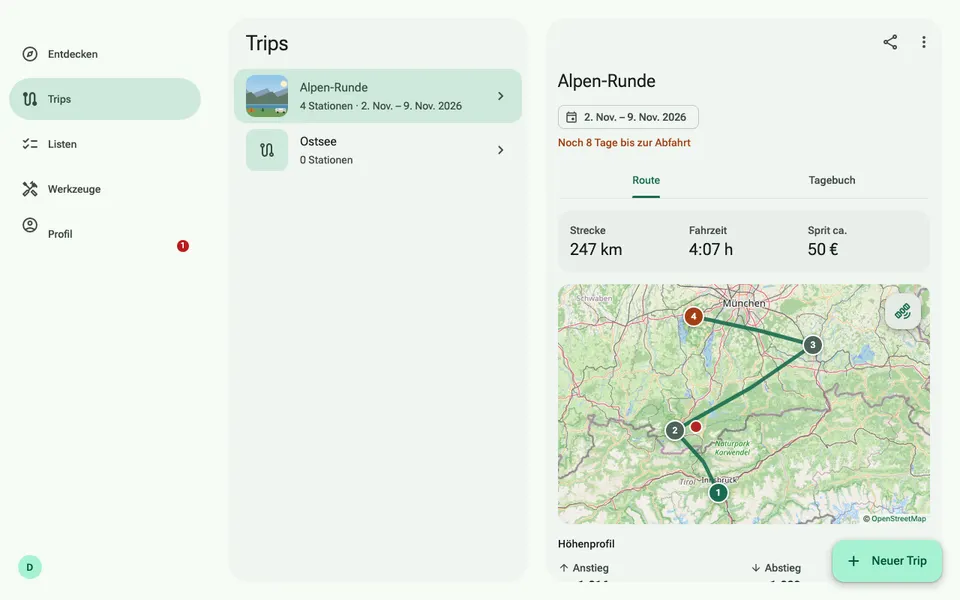
- Under Trips, create a new trip and add sites as stops, also directly from the site detail. You change the order by dragging.
- In the Route tab you see distance, driving time and notes for your vehicle. In Germany, Austria, Switzerland and the Alps, the elevation profile with steep sections is added.
- In the Diary you record days with text, photos and mood.
- “Share trip” creates a link that others can view without an account. You can also open the trip in Google Maps, save it as a file or add it to your calendar.
- No time to plan? Under Trips → Plan a route enter start, destination and distance per day and get a site suggested for each night. Don’t like one? Shuffle again.