5. Prices and services
Campers compare sites mostly by price. The more precise your details, the fewer calls you get. Everything is optional – even a single pitch price helps.
How it works
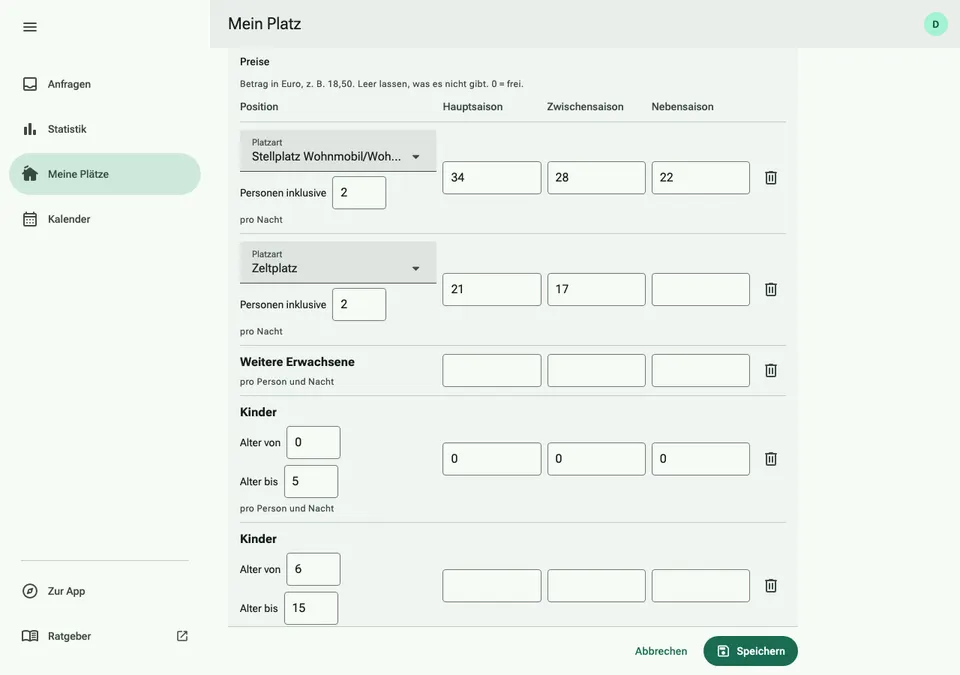
- Open “My site” and, at your site, “Edit site”. Under “Prices”, choose a template: “Typical campsite” sets up three seasons with pitch, people, children, dog, electricity and tourist tax; “Motorhome stopover” one price for the whole year.
- Set the seasons with dates, for example “High season” from 01.07. to 31.08. A season may have several periods, such as May/June and September, also across the turn of the year. The coloured year bar shows whether every day is covered.
- In the table, enter the prices per night for each season: the pitch with the people already included, additional adults, children by age group and the dog. 0 means free; empty fields are not shown.
- Charge electricity as a flat rate per night, by consumption (kWh) or as a flat rate with included kWh. The tourist tax applies to all seasons; children up to a certain age can be exempt.
- Mark services such as showers, Wi‑Fi or the washing machine as “Included” or “Paid”, add minimum stay, CampingCard ACSI and long‑stay discount, and tap “Save”.
How campers see your prices
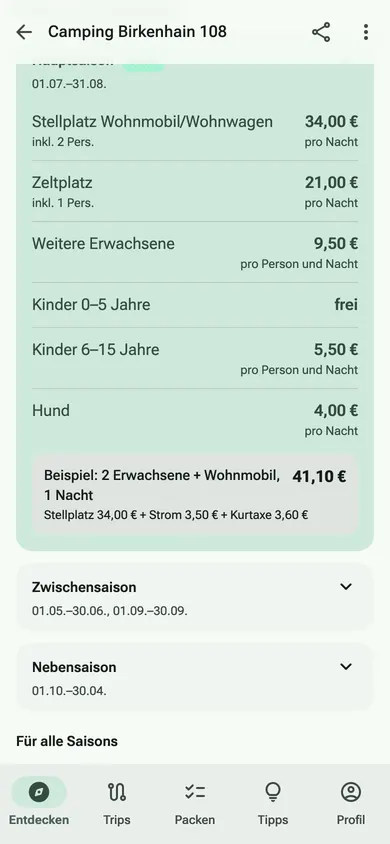
On your site page and in the app, the current season is shown expanded and marked. Below it, ViaCamp works out an example: 2 adults with a motorhome, one night, including electricity and tourist tax. Services are listed as included or for a fee, followed by the date of your details.